Now on Google Play

Sticky notes that float on top of any app.

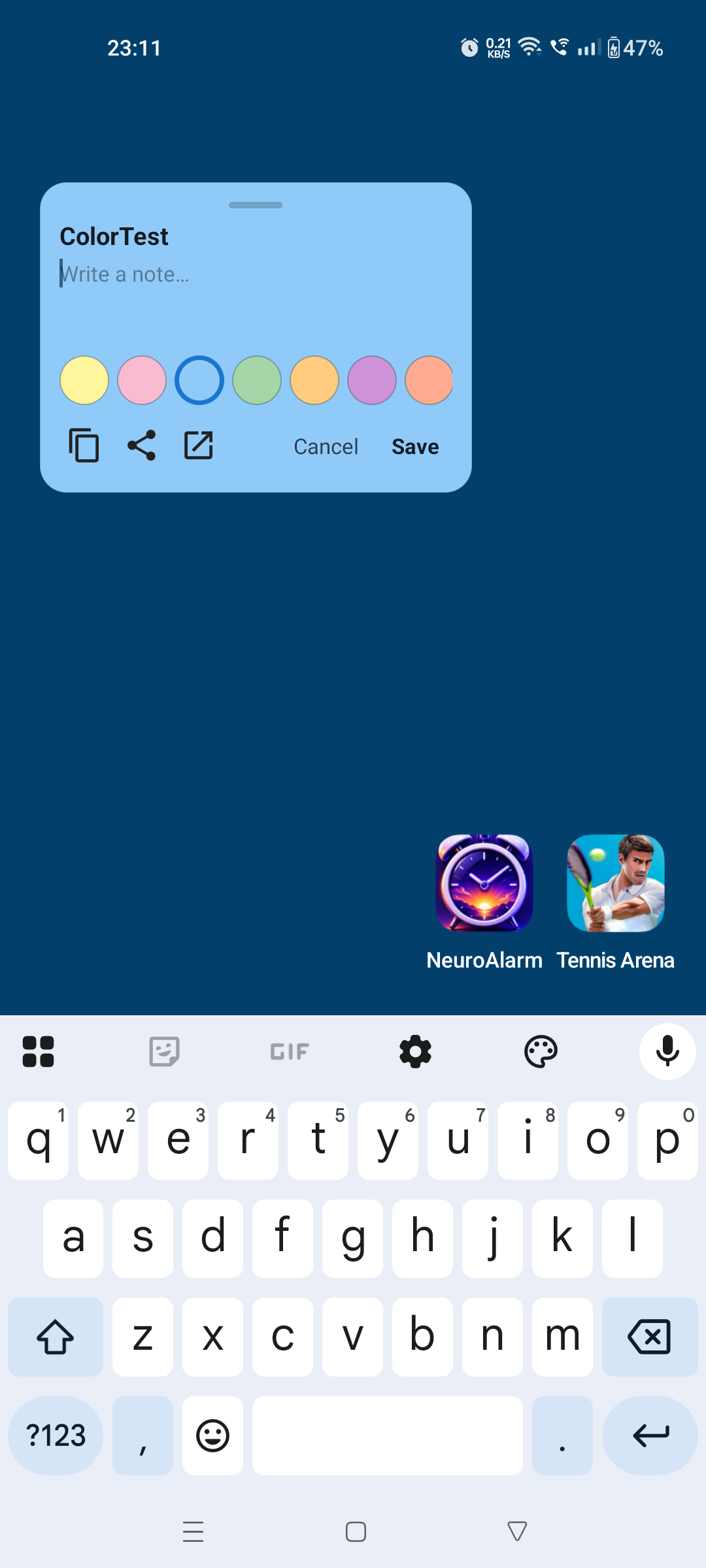
Open the app, write a note, hit "Float on screen". The note stays visible above your trading app, your browser, your calendar — wherever you are. 100% on-device. No ads. No accounts. No tracking.

Floating sticky note on screen
📈 Buy NIFTY 22,400 PE if breaks 22,500 ✕
📞 Call mom 6 PM — meds reminder
✓ Submit assignment by 11:59
Why StickyHover

Notes apps make you switch context. StickyHover doesn't.

Built for traders, students, doctors and freelancers who work across multiple apps and need their notes to follow.

🪟

Always visible

Notes float as draggable, resizable windows on top of every app. Move them. Resize them. Park them in a corner.

🔒

100% private

Zero analytics, zero trackers, zero accounts. Your notes never leave your phone. Backups go directly to your Google Drive.

Built for speed

Cold-starts in under a second. OCR runs on-device. Voice dictation works offline. No login, no signup, no setup screens.

Premium floating effects — Pro

Notes that fold into bubbles — and float around your screen.

Collapse any floating sticky into a tidy chat-head bubble, fling it anywhere, tap to bring it back full size. Multiple notes, multiple colours, all live on top of whatever you're doing. Here's the effect playing:

Flagship feature

One floating note, every app, every time.

Tap the float button. Your note becomes a draggable window on top of whatever app you're using. Stack as many as you want with Pro.

  • Drag anywhere on screen
  • Resize by dragging the corners
  • Set opacity per note (Pro)
  • Click-through mode lets you tap the app underneath (Pro)
  • Per-app context: show only on Zerodha, hide on WhatsApp (Pro)
Multiple floating notes on screen
New in v1.10.0

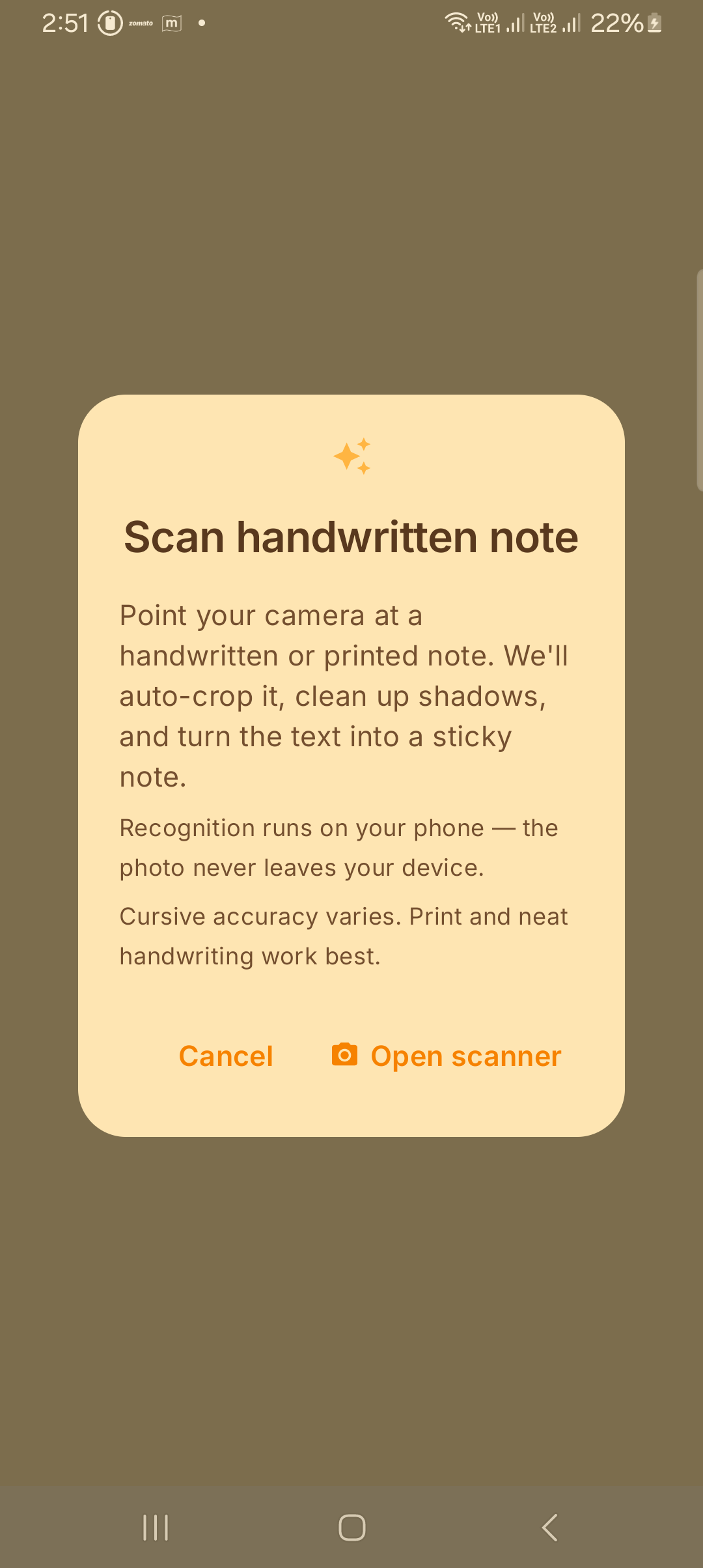
Scan a handwritten note → instant sticky.

Point your camera at any printed or handwritten note. We auto-crop, deshadow and turn the text into an editable sticky in seconds. All on your device — the photo never leaves your phone.

  • Camera + perspective correction by Google ML Kit Document Scanner
  • On-device text recognition — no internet needed after first model fetch
  • Lands in the full edit screen with colours, fonts, reminders, tags
  • Free for everyone
Note edit screen with all panels
Pro feature

Pop a note onto the screen — only on the apps you choose.

Show a trade plan only when Zerodha is open. Hide a personal checklist when WhatsApp is. Granular per-app rules that just work.

  • Pick from your installed app list
  • Modes: Show only on / Hide when / Always
  • No accessibility service required (uses Android Usage Access)
  • Reads only the foreground package name — never window content
Per-app context picker
Pro feature

Reminders that talk back to you.

Pick a date, time, recurrence. Pick a custom alarm sound from your ringtones. Pick from 7 vibration patterns. Or have your phone read the note out loud when the alarm fires — perfect for driving or accessibility.

  • Per-note alarm sound — from any ringtone on your phone
  • 7 vibration patterns: Subtle, Standard, Strong, Pulse, Heartbeat, Knock, Silent
  • Voice readout — "your sticky talks back" via on-device TTS
  • Daily, weekly, monthly recurrence + snooze 5 / 15 / 60 min
  • Survives reboot via Android AlarmManager
Premium reminder panel with sound, vibration, voice readout
New in v1.13 — Pro

5 premium floating effects, on every note.

Make your floating stickies feel alive. Glass-blur backgrounds, physics-based drag, magnetic edge snap, tap-to-collapse into a 56dp bubble, and a card-deck cascade when 3+ notes are open. Toggle each one independently.

  • Collapse to bubble — shrink any sticky into a Messenger-style chat-head
  • Glassmorphism — frosted-glass blur (Android 12+)
  • Spring drag — release a note and it flings with momentum
  • Edge snap — magnetic dock to nearest screen edge with haptic tick
  • Card deck — fan 3+ notes into a tidy cascade at one corner
5 premium floating effect toggles
New in v1.14 — Pro

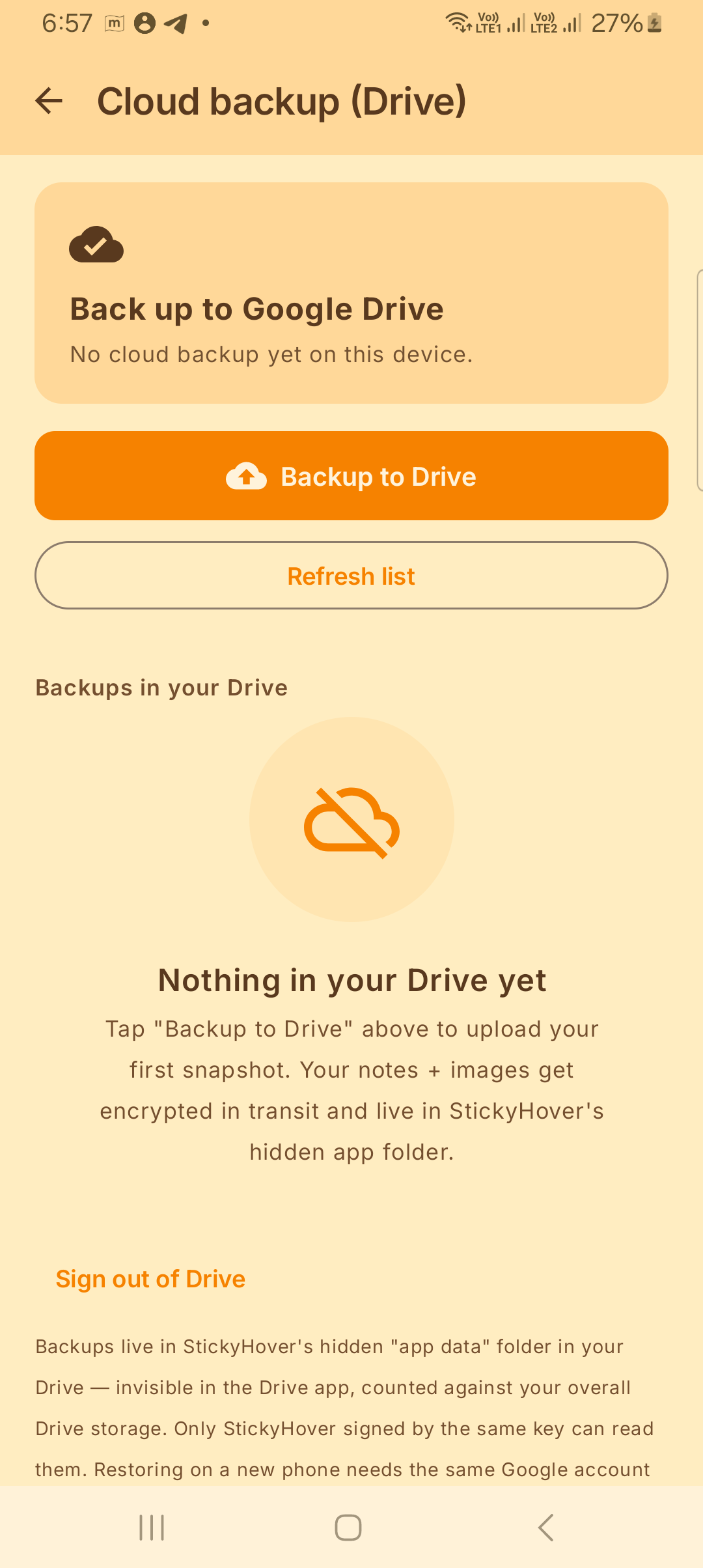
Cloud backup, restored on any phone.

Back up to your own Google Drive's hidden app folder. Restore on a new phone signed into the same account — every note, every image, every reminder back exactly as you left them. Survives factory reset, lost phone, switched device.

  • Encrypted-in-transit upload to your Drive's app data folder
  • Invisible in the Drive UI — only StickyHover signed by the same key reads them
  • Manual export to a JSON file is still free for everyone
  • Free Android Auto Backup is still configured — restore on reinstall, no setup
Drive cloud backup screen
New in v1.12 — Pro

4 premium themes + 4 launcher icons.

Switch the whole app's look in one tap. Midnight (OLED black + gold), Sakura (cherry blossom), Forest (mint & moss), Cosmic (deep indigo). Match your home-screen icon to the theme — all four variants ship.

  • Midnight Pro — OLED-friendly, saves battery on Samsung / Pixel
  • Sakura — soft pinks, optimized for light mode
  • Forest — calm mint and moss, easy on the eyes
  • Cosmic — deep indigo + violet, dark-mode favourite
Theme picker showing 4 premium themes
New in v1.16 — Free

Open a note to read it. Tap to edit it.

Tapping a note now opens a clean, full-screen reading view first — no more accidental edits. Hit the pencil when you actually want to change something. Attach an image and drag it anywhere inside the note; the spot you choose sticks on the card and in the floating overlay.

  • Distraction-free, full-page read view
  • Separate edit mode — tap the pencil or the note body
  • Drag an embedded image to any position in the note
  • Pin, share or delete straight from the read view
Full-screen read view of a note
New in v1.17 — Free

Turn any note into a tick-off checklist.

One tap converts a note into a checklist — or start fresh from the Checklist template. Tick items off right in the read view and they strike through. Switch back to plain text whenever you like.

  • Tap to check — items strike through as you go
  • Convert any note to a checklist, and back to text
  • Renders as a checklist on cards, floating notes and the widget
  • Free for everyone
Checklist note with checked and unchecked items
New in v1.17 — Free

Start faster with built-in templates.

The + button now offers ready-made starting points, so you're never staring at a blank note. Pick a Shopping list, Meeting notes or a Daily plan — or a blank checklist — and just fill in the blanks.

  • Shopping list, Meeting notes, Daily plan
  • Blank note or blank checklist
  • Pre-formatted structure, ready to edit
  • Free for everyone
New note template picker
New in v1.18 — Pro

Draw it. Sign it. Drop it in a note.

Sketch a quick diagram or sign with your finger on a clean canvas — six ink colours, adjustable brush, eraser and undo. The drawing saves straight into your note and shows everywhere the note appears, including the floating overlay.

  • Finger or stylus drawing on a full-screen canvas
  • 6 colours, adjustable brush width, eraser, undo, clear
  • Perfect for signatures, diagrams and quick sketches
  • Saved as the note's image — floats with the note too
Drawing canvas with colour palette
New in v1.18 — Pro

Record a voice memo, right in the note.

Tap record, speak, done. The clip attaches to the note and plays back from the edit screen, the read view, the list — and even the floating overlay. Audio is stored only on your device.

  • One-tap record; playback anywhere the note shows
  • Plays inside the floating overlay too
  • Re-record or remove in a single tap
  • Stored locally — never uploaded
Voice memo recording in a note
New in v1.18 — Pro

Dictate instead of typing — the mic stays on.

Tap Voice typing and just talk. Your words drop into the note as you speak, and the mic keeps listening through your pauses until you tap Stop — no more cutting off after two seconds. Recognised on your device for privacy.

  • Speak your note — text appears live as you go
  • Mic stays open through pauses; you decide when to stop
  • On-device speech recognition (Android 13+)
  • Append to any note, hands-free
Voice typing dictation in a note
New in v1.21 — Pro

Bold it. Highlight it. Make it readable.

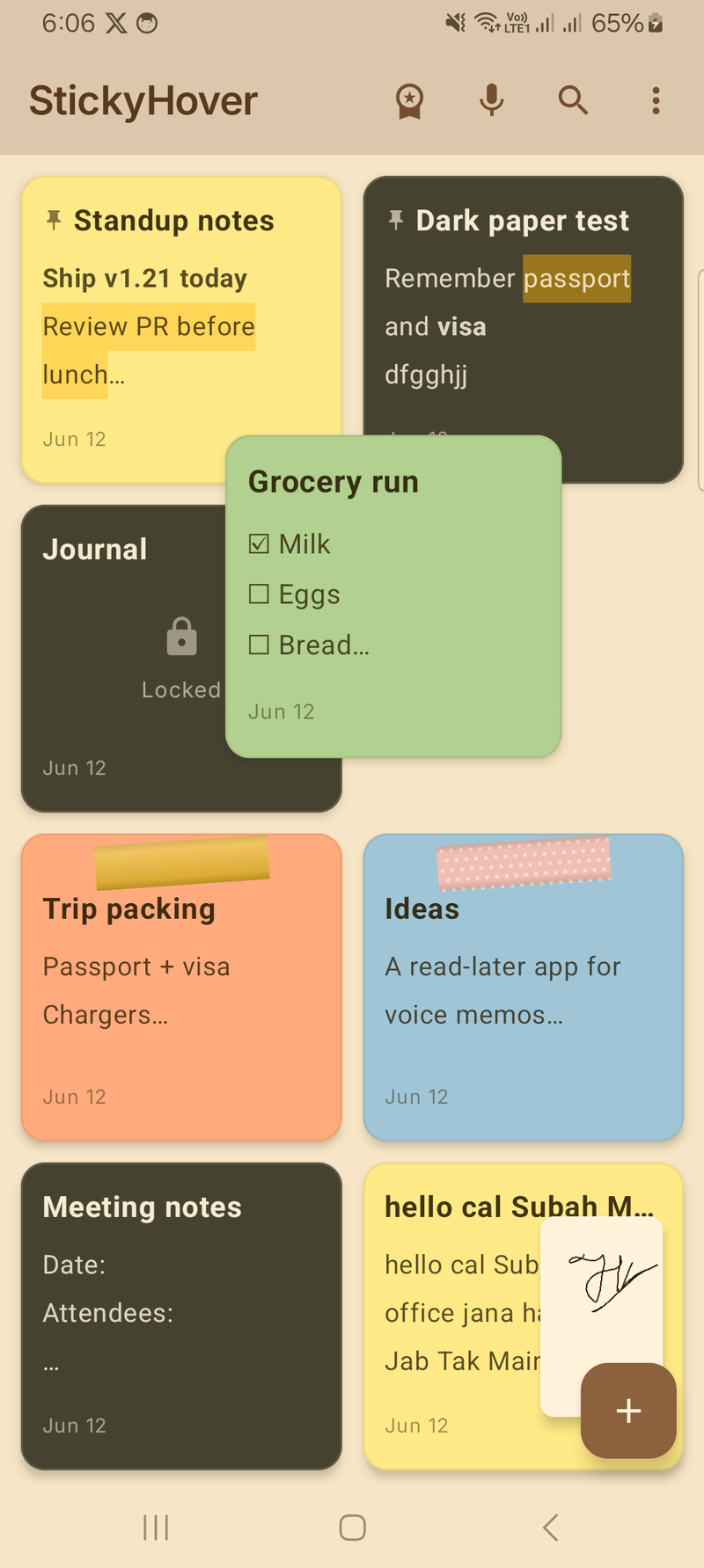
Lightweight formatting that lives right in your text: bold, italic, headings and a marker-style highlight that adapts to the paper — it stays visible on yellow, white and even dark notes.

  • One-tap toolbar: bold, italic, heading, highlight
  • Highlight auto-adjusts to light or dark paper
  • Renders on cards, floating notes and the widget
  • Plain text underneath — exports stay clean
Text formatting with highlight in the editor
New in v1.20 — Pro

Some notes are nobody's business.

Lock any note behind your fingerprint or screen lock. The content disappears from the list, the widget and notifications — just a quiet "Locked" card until you unlock it.

  • Fingerprint or device PIN — your choice
  • Content hidden everywhere: list, widget, reminders
  • Locked notes never float on screen
  • Relocks automatically when you leave the app
Notes grid with a locked note card
New in v1.21

Your grid, your order.

Long-press and drag any note to wherever it belongs. The card lifts, the grid makes room, and your order sticks — pinned notes stay on top.

  • Long-press → drag → drop. That's it
  • Order persists across restarts
  • One tap returns to most-recent sorting
Dragging a note card to reorder the grid
New in v1.19

Deleted ≠ gone. Undo, or dig it out later.

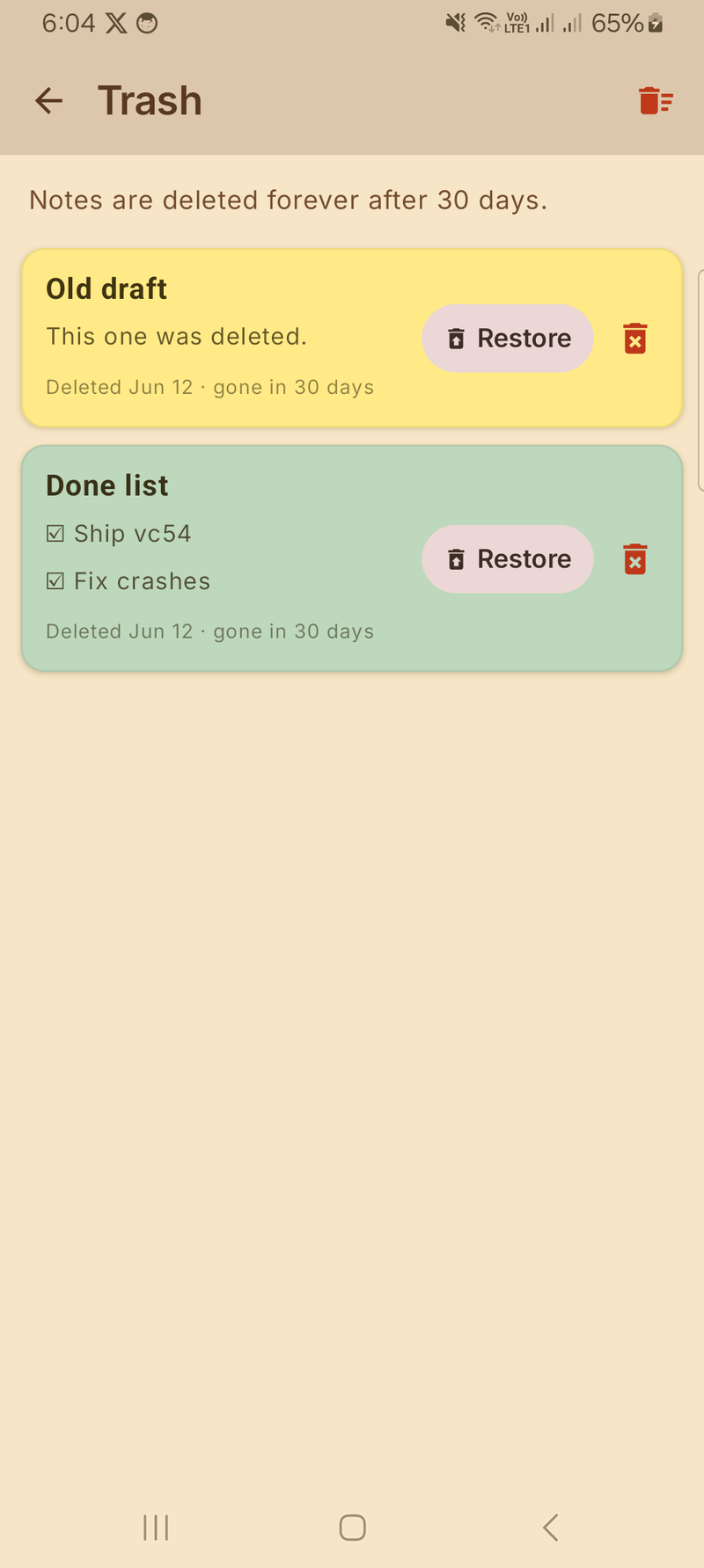
Every delete shows an instant Undo. Miss it? Notes rest in the Trash for 30 days before they're gone for good — restore or purge them anytime.

  • Undo snackbar on every delete
  • 30-day Trash with one-tap Restore
  • Empty the trash whenever you want
Trash screen with restore buttons
New in v1.19

Capture from anywhere on your phone.

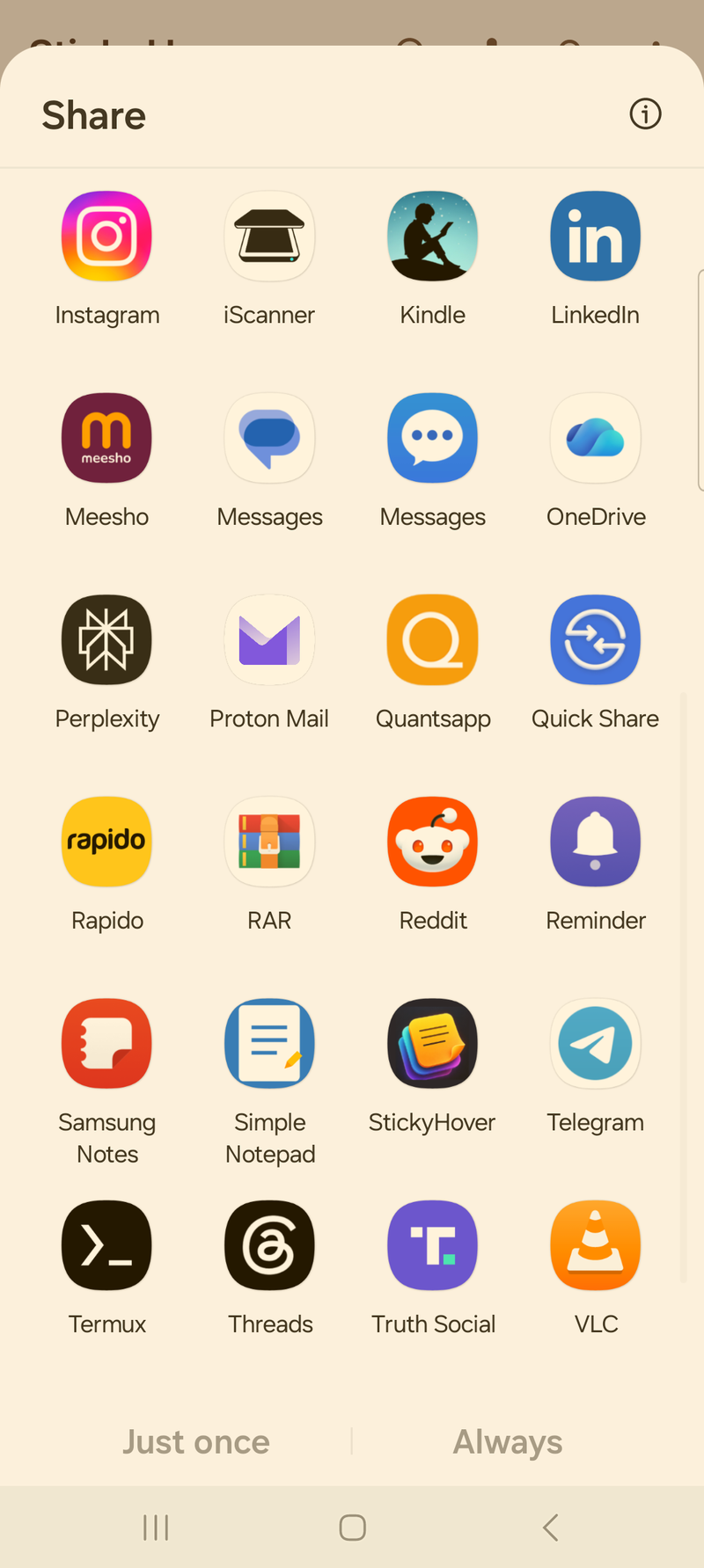
Share text from any app — a link, an address, a message — straight into a new sticky. Or add the Quick Settings tile and start a note without even opening the app.

  • StickyHover in every share sheet
  • Quick Settings tile for instant new notes
  • Shared subject lines become note titles automatically
Android share sheet with StickyHover as a target
Paper that feels like paper

Washi tape, gradients and a colour for every mood.

Six washi tape styles dress up any note. Ten preset papers — including a deep slate that flips the text to white — plus any custom hex colour and 8-angle gradients.

  • 6 washi tapes: kraft, gold, stripes, dots and more
  • New slate paper with automatic white ink
  • Custom hex picker + linear gradients
Note decorated with washi tape
Free for everyone

Everything you'd expect, plus a lot you wouldn't.

The free tier isn't a stripped-down demo. It's a real, polished sticky-notes app.

📝

Unlimited notes

Create, edit, pin, delete. Auto-saved. Searchable.

↔️

Resizable floating notes

Drag the corner to resize any floating note — the size is remembered. Long notes scroll inside the window, so every line stays readable.

🎨

10 colours, 8 fonts

Nine bright papers plus a deep slate that flips text to white. Serif, mono, cursive, handwritten and more.

🌈

Custom hex + gradients

Pick any RGB colour. Apply 8-angle linear gradients to any note.

🏷️

Tags + global search

Tag any note with any label. Search across titles, content and tag names.

🎤

Voice-to-text

Tap the mic, speak, done — your words land in a new sticky. Recognised on your device.

📷

Scan handwritten note

Camera → on-device OCR → editable sticky. Free for everyone.

📲

Home-screen widget

2×2 widget shows your latest or pinned note. One tap to open.

☁️

Drive auto-backup

Daily backup to your Google Drive. Restored when you reinstall.

📦

JSON export / import

Full data portability. Move to another phone in 2 taps. Your data is yours.

📖

Read-first view

Open a note to read it full-screen. Editing is a separate tap, so nothing changes by accident.

☑️

Checklists

Turn any note into a tick-off list. Items strike through as you check them. Convert back to text anytime.

🗂️

Note templates

Start from Shopping list, Meeting notes or a Daily plan instead of a blank page.

↕️

Drag to reorder

Long-press and drag cards into your own order. It sticks until you change it.

🗑️

Undo + 30-day Trash

Every delete is undoable. Trash keeps notes for 30 days before letting go.

Quick capture

Share text from any app into a sticky, or use the Quick Settings tile.

🎀

Washi tape

Six tape styles — kraft, gold, stripes, dots — to dress up any note.

★ ONE-TIME UPGRADE

Pro features for power users.

No subscription. No recurring charges. Pay once, keep forever.

✍️

Draw & sign

Sketch or sign with your finger — 6 colours, brush sizes, eraser. Saves into the note and floats with it.

🎙️

Voice memo

Record an audio clip in any note. Plays back from the list, read view and the floating overlay. Stored on-device.

🗣️

Voice typing

Dictate hands-free — the mic stays on through pauses until you stop. On-device speech, no audio uploaded.

🔒

Locked notes

Fingerprint or PIN-protect any note. Content hides from the list, widget and notifications until you unlock.

Text formatting

Bold, italic, headings and a paper-aware highlighter — one tap in the editor, rendered everywhere.

Premium floating effects

Glassmorphism, spring drag, edge snap, collapse-to-bubble, card-deck cascade. 5 effects, toggle each.

☁️

Drive cloud backup

Backup to your own Drive's app folder. Restore on any phone with the same Google account.

🔔

Premium reminders

Per-note alarm sound, 7 vibration patterns, voice readout — phone speaks the note before the chime.

🪟

Multi-floating notes

Stack five trade plans, three call scripts, a checklist — all on screen at once.

🎯

Per-app context

Show or hide a note based on which app is open. Zerodha-only? Done.

🔍

OCR bubble

Persistent floating bubble — tap to capture text from anywhere on screen, into a sticky.

🎨

4 premium themes

Midnight (OLED black + gold), Sakura, Forest, Cosmic. Swap the whole app's look in one tap.

📲

4 launcher icons

Match your home-screen icon to the theme — Midnight, Mint, Sakura, or Mono.

👻

Click-through mode

Make a floating note transparent to taps so the app underneath stays usable.

🖼️

Image attachments

Add a photo or screenshot. Renders inline in the floating overlay.

📞

Auto-float on call

A designated note pops up when a call starts. Perfect for call scripts.

🌫️

Per-note opacity

Adjust transparency on each floating note independently.

Monthly ₹100 $3.99 · £3.49 · €3.99

7-day free trial, then billed monthly. Cancel anytime.

Annual · Save ~50% ₹600 $19.99 · £17.99 · €19.99

7-day free trial, then billed yearly. The sweet-spot tier.

Lifetime ₹1,000 $39.99 · £34.99 · €44.99

One-time. Every Pro feature. Forever.

Prices set per Google Play regional pricing — local currency on your device. Subscriptions auto-renew unless cancelled in Play at least 24h before period end. Lifetime is a single in-app purchase.

Privacy you can verify

The app doesn't even know you exist.

No analytics SDK. No crash reporter. No advertising ID. No third-party servers.

🚫

Zero data collection

Nothing you write, photograph or record leaves your phone.

🆔

No accounts, no logins

The app has no concept of "users". No signup. No password.

🤖

OCR runs on-device

Google ML Kit, after a one-time model download. No image ever uploaded.

🎙️

Voice stays local

Your phone's speech recogniser handles audio. We receive only the text.

Read the full privacy policy →

Frequently asked

Questions, answered.

Is this really free?

Yes. The free tier is fully usable — unlimited notes, all colours, fonts, gradients, tags, search, voice, widget, drive backup, JSON export, one floating note, and camera scan are free forever. Pro is optional: choose a monthly or annual subscription — both with a 7-day free trial — or a one-time Lifetime purchase.

Why does it ask for "Display over other apps"?

That's the Android permission required for any app that wants to render a window on top of other apps — exactly what makes a "floating note" possible. Without it, StickyHover still works as a regular notes app, you just can't float notes. You're never forced to grant it.

What happens to my data when I uninstall?

It's gone. Every byte. Local Room database, image attachments, preferences — wiped along with the app. If you'd enabled Android's Auto Backup to your Google Drive, you can also delete that copy from drive.google.com → Storage → Backups → StickyHover.

What's the difference between Auto Backup (free) and Drive Cloud Backup (Pro)?

Both go to your Google Drive — never our servers. Auto Backup (free) uses Android's system-level backup: silent, daily, restored automatically when you reinstall on the same Google account. 25 MB cap. Drive Cloud Backup (Pro) is a manual on-demand backup to a hidden app folder you control — bigger, restorable on any device with the same account, multiple snapshots over time. Both stay private; only StickyHover signed with the same key can read either.

"Voice readout" — what is it?

A Pro reminder toggle. When the alarm fires, your phone speaks the note's title and first content line out loud before the chime starts. Useful for driving, accessibility, or just looking like a wizard at your desk. Uses on-device TTS (Samsung TTS or Google TTS, whichever your phone has installed) — no audio leaves your device.

Can I change the app's color theme?

Yes. The free tier ships with the warm-orange Sunshine theme. Pro adds 4 more — Midnight (OLED black + gold, saves battery on AMOLED screens), Sakura (cherry blossom), Forest (mint & moss), Cosmic (deep indigo + violet). Switch any time without restarting the app, and pick a matching home-screen icon variant separately.

What about my voice when I dictate a note?

The audio goes to your phone's built-in speech recogniser (typically Google's). We receive only the transcribed text once you finish speaking. We never record, store or upload audio.

Does the OCR / camera scan upload my photo?

No. Recognition runs entirely on your device using Google's ML Kit. The image is processed in memory and discarded the moment text is extracted. Nothing is uploaded.

How accurate is OCR on cursive handwriting?

Honestly? Print and neat handwriting work great. Cursive is hit-or-miss — that's a limitation of on-device models. We picked on-device over a cloud model because it's the only way to keep your notes private. Expect ~95%+ on printed text, ~70%+ on neat block-letter handwriting, and varying results on cursive.

What devices is it compatible with?

Android 7.0 (API 24) and above. Most features work on every device; the camera scan needs Google Play Services and at least 1.7 GB RAM (every modern Android has this).

Will there be an iOS version?

Not on the roadmap. iOS doesn't allow third-party floating overlays system-wide (the core feature wouldn't work) and ships its own Stickies/Notes equivalent.

Get StickyHover today.

Now on the Google Play Store. Free with optional Pro upgrade.

Get it on Google Play